Be yourself; Everyone else is already taken.
— Oscar Wilde.
This is the first post on my new blog. I’m just getting this new blog going, so stay tuned for more. Subscribe below to get notified when I post new updates.
Be yourself; Everyone else is already taken.
— Oscar Wilde.
This is the first post on my new blog. I’m just getting this new blog going, so stay tuned for more. Subscribe below to get notified when I post new updates.
Hello Reader!!
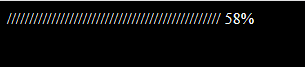
As the title of the post suggests, in this post i am going to tell you how you can easily make a cool, good-looking, amazing, modern and working progress or loading bar in HTML, CSS and JavaScript. I have provide the programming code of the loading bar below. You can edit the code as per your need but some JS functions should not be changed.
If you have any doubt about the code then feel free to ask in the comments below.
<!DOCTYPE html>
<html>
<!-- Code by Intra Tips. Instagram - tipsintra -->
    <head>
        <title>Page Title</title>
    </head>
    <body>
        <div class="intrabar"></div>
    </body>
</html>body {
background-color: #000;
color: white;
}
/* Code by Intra Tips. Instagram - tipsintra */onload = init;
var intrabar, bars=bar="░";
var count = 0;
//Code by Intra Tips. Instagram - tipsintra
function init() {
intrabar = document.querySelector(".intrabar");
setInterval(function() {
count = count<100?count+1:0;
if(count===0) bars = bar;
else if(count%5 === 0) bars += bar;
intrabar.innerText = `${bars} ${count}%`;
}, 100);
}
Share this with your friends if you like it ans subscribe to get more posts like this!
Thank You!
Tanishq Goyal (author of this blog)
Hello Reader!!
So you have come to this post to know the way by which you can see the old layout with its content of your website. You might think that once changed, the earlier design of your website is inaccessible but that’s not the case here! I have got to you, the way by which you can see the archives of your website very easily. And that also for free!
Seeing old archives is very helpful because by seeing the old archives with viewers data, you can easily find out that in which design you got the maximum number of clients or viewers. You can also see if the layout you had ten years back was more worthy or not than the current one. Old layouts ordered in a good pattern also enables you to look how your website have evolved over the time.
Step 1 : Go to http://web.archive.org . It is a digital archive of the World Wide Web, founded by the Internet Archive, a nonprofit organization based in San Francisco. The name of this digital archive is “Wayback Machine”.
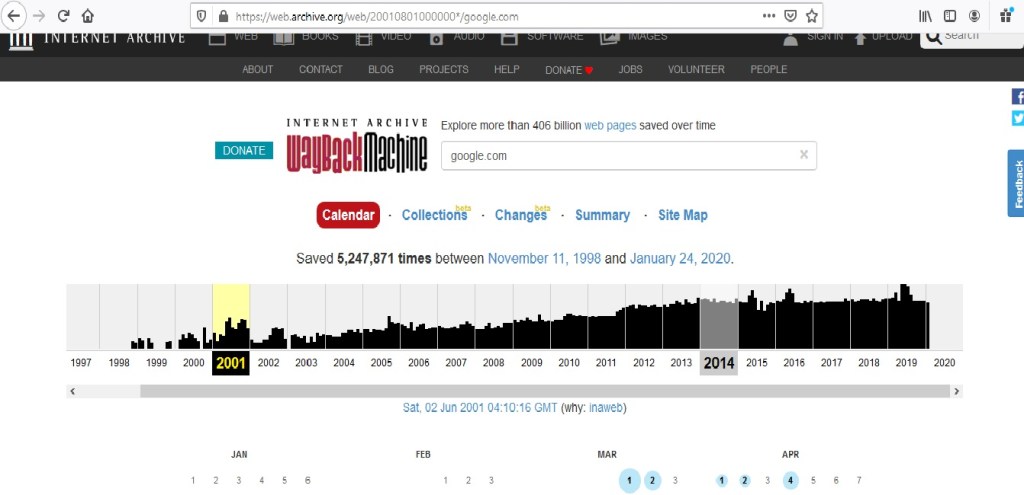
Step 2 : Enter the URL of the website of which you want to see the old layout. I have types google.com to see its old layout. Press Enter. A type of calendar appears.
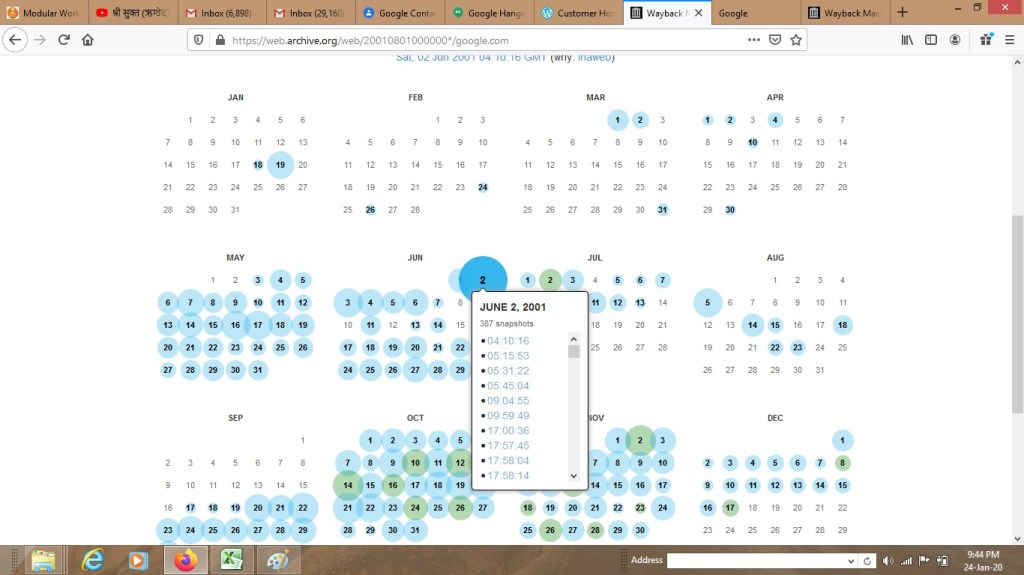
Step 3: Select the desired year from a timeline that appears on top. Then select the desired date of which you want to see the layout. The blue circle on dates show that there is a snapshot available of that day.
Step 4: You see the website layout ready. Now you can explore it and see whatever you want.
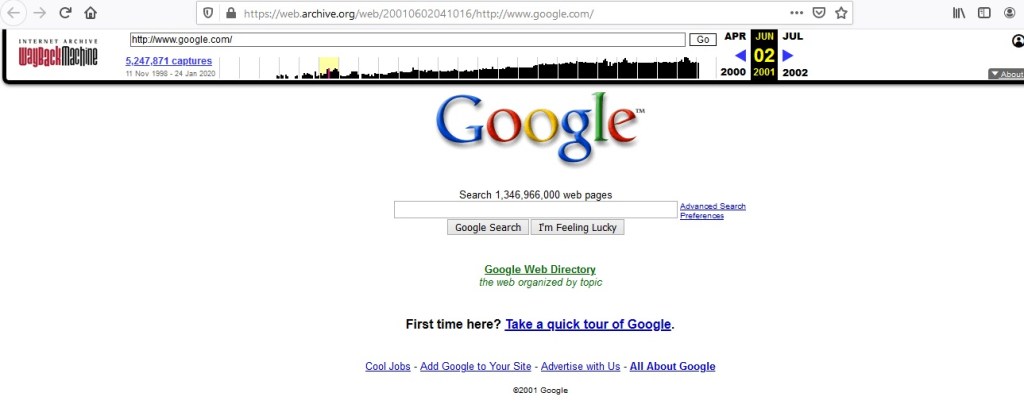
You can also change the day and see the layouts captures on different dates. If you also want to see the coding of your old layout then you can see the code of the whole page by adding ” view-source: ” in starting of the URL. Then you can find the desired code from this coding.
If you liked the way taught by me then share this with your friends also and don’t forget to follow my blog. By following and subscribing my blog, you will get to know more knew tips and tricks like this one. Gracias!!
For any suggestions or ideas or business queries, then feel free to mail me at – tanishqgoyalofficial@gmail.com
One of the biggest questions that come to your mind while purchasing a domains is that – “Should I use hyphens in my domain name?”
A domain with hyphens looks like : example-hyphen-site.com . There are two broad possibilities while using hyphens in the name of a domain –
To give you a correct answer about this with proofs so that you are 100% firm on my suggestions, I conducted some tests on various web URLs. In this post you will see what research I did and what were the results.
Godaddy Appraisal is a tool by Godaddy.com which helps us to calculate the approximate value of a domain name by entering its URL. You might have heard and even used this tool before. I found the values of some domains by first entering them without hyphens and then with hyphens, below are the results that i got –
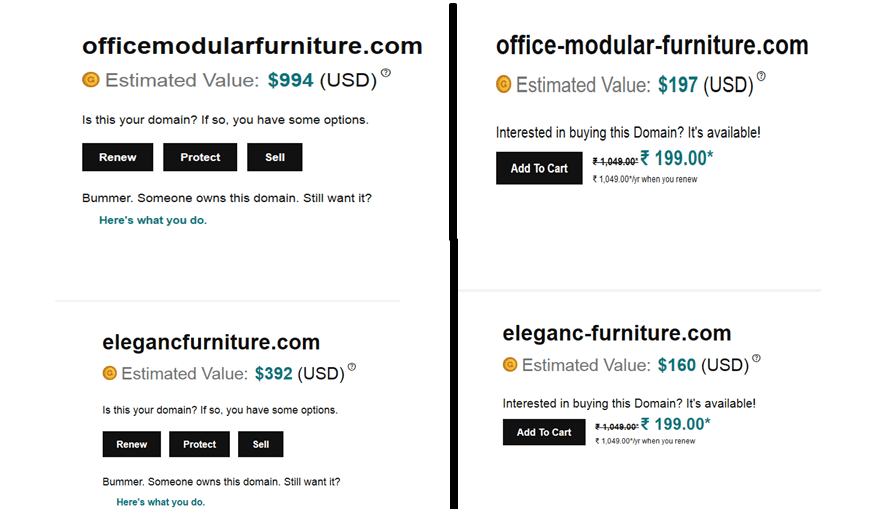 The domains that i tested can be seen in the picture above. The picture compares the values of some domains and if you study it carefully then you will notice that using hyphens in the domain name has reduced the domain value. You see that using hyphens reduced the value of first domain by $797 !! This is a huge amout! The second domain also has the same case with its value.
Hello Reader! Welcome to Intra – Tips family. Let me introduce myself to you, I am Tanishq Goyal, the author of this blog. The blog that you are currently at is a blog about technology, SEO, web tools, tips, tricks, programming and all about technology! This is the First post but you are definitely gonna see new posts! I talk about various tip and tricks and guides to web development and programming. I will also talk on how to make your website rank higher on Google page and get you more viewers without spending much on advertisement. Think, how wonderful it would be if your business website gets to a higher rank with simple tricks that don’t cost a penny! It might also be possible that there might be some secrets about web ranking that you don’t knew before and will get to know here on this blog. These can also help you increase your business sales! For example, while buying a domain for your website, you might get confused if you should you hyphens (-) or not.. This is a big question! right? Don’t worry, I will tell this in one of my posts, just search my blog!
So, this was about web development but i also post about programming. In this blog, I will tell you tips, tricks and secrets of programming that you need to know whether you are a beginner or intermediate. You will also see some codes in HTML, XML, CSS and JS that are small but very fascinating and can be easily used by you in your project or to impress your friends, whatever you like.
If you have any suggestions or business queries about this blog then you are absolutely liberal to mail me at – tanishqgoyalofficial@gmail.com
Thanks Dear Reader for spending your precious minutes here. I hope you’ll find this blog useful for your work.
This is an example post, originally published as part of Blogging University. Enroll in one of our ten programs, and start your blog right.
You’re going to publish a post today. Don’t worry about how your blog looks. Don’t worry if you haven’t given it a name yet, or you’re feeling overwhelmed. Just click the “New Post” button, and tell us why you’re here.
Why do this?
The post can be short or long, a personal intro to your life or a bloggy mission statement, a manifesto for the future or a simple outline of your the types of things you hope to publish.
To help you get started, here are a few questions:
You’re not locked into any of this; one of the wonderful things about blogs is how they constantly evolve as we learn, grow, and interact with one another — but it’s good to know where and why you started, and articulating your goals may just give you a few other post ideas.
Can’t think how to get started? Just write the first thing that pops into your head. Anne Lamott, author of a book on writing we love, says that you need to give yourself permission to write a “crappy first draft”. Anne makes a great point — just start writing, and worry about editing it later.
When you’re ready to publish, give your post three to five tags that describe your blog’s focus — writing, photography, fiction, parenting, food, cars, movies, sports, whatever. These tags will help others who care about your topics find you in the Reader. Make sure one of the tags is “zerotohero,” so other new bloggers can find you, too.

 Intra Tips