How to make a cool looking Loading Bar in HTML, CSS and JavaScript?
Hello Reader!!
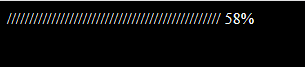
As the title of the post suggests, in this post i am going to tell you how you can easily make a cool, good-looking, amazing, modern and working progress or loading bar in HTML, CSS and JavaScript. I have provide the programming code of the loading bar below. You can edit the code as per your need but some JS functions should not be changed.
If you have any doubt about the code then feel free to ask in the comments below.
HTML Code-
<!DOCTYPE html>
<html>
<!-- Code by Intra Tips. Instagram - tipsintra -->
    <head>
        <title>Page Title</title>
    </head>
    <body>
        <div class="intrabar"></div>
    </body>
</html>
CSS Code-
body {
    background-color: #000;
    color: white;
}
/* Code by Intra Tips. Instagram - tipsintra */
JavaScript Code-
onload = init;
var intrabar, bars=bar="░";
var count = 0;
//Code by Intra Tips. Instagram - tipsintra
function init() {
    intrabar = document.querySelector(".intrabar");
    setInterval(function() {
        count = count<100?count+1:0;
        if(count===0) bars = bar;
        else if(count%5 === 0) bars += bar;

        intrabar.innerText = `${bars} ${count}%`;
    }, 100);
}
Share this with your friends if you like it ans subscribe to get more posts like this!
Thank You!
Tanishq Goyal (author of this blog)
 Intra Tips